Pupline Review 2026: Flat-Priced Software for Kennels, Daycares and Solo Pet Pros
Pupline prices by pet spaces instead of staff seats and puts every feature on every plan; here is what that gets you, where it stops, and who should pick something else.
This site is published by the team behind Pupline, our top pick. Who we are
This Pupline review is for owners of independent dog daycares, boarding kennels and catteries, and for solo walkers, sitters, groomers and trainers who are deciding whether Pupline fits the way they work. Pupline is our own product: this site is published by the team that builds it, and it is the top pick in our rankings. That makes it more important, not less, that this review is specific about what Pupline does and plain about what it does not do. Everything below describes features we use every day, and every price comes from the Pupline pricing page as of November 2026.
- Ease of use
- 9.5
- Features
- 9.0
- Value for money
- 9.7
- Support
- 9.4
Scores follow our review methodology.
- Our score
- 9.4
- out of 10
- Starting price
- $19
- per month, USD
- Free trial
- 30 days
- self-serve
- Features included
- 14/18
- of those we could verify
Who Pupline is for, and who it is not for
Pupline was built for the owner-operator. That means a boarding kennel with 20 runs and a cattery block, a daycare that takes 40 dogs on a busy Tuesday, or a dog walker with a full diary and no office staff. If you run one site and want the front desk, the booking diary and the billing in one place, it is designed for you.
It suits you if:
- You run a single daycare, boarding kennel, cattery or pet hotel and want to see who is in which run today at a glance.
- You are tired of paying per staff seat, because your weekend and holiday staff change every season.
- You want online booking requests without forcing every client to create an account first.
- You want someone else to move your data out of your old system.
- You work alone as a walker, sitter, groomer or trainer and need scheduling, invoicing and client records for less than the cost of a coffee a week.
It does not suit you if:
- You run two or more locations and need central reporting across them, because Pupline has no multi-location management.
- Your clients expect text message reminders from you, because Pupline sends notifications by email and web push, not SMS.
- A big share of your revenue is retail through a till, because there is no point-of-sale or card reader.
- Your staff insist on a native app from the App Store or Google Play, because Pupline runs in the browser and installs as a web app.
- You are a trainer whose business is mostly group classes, because group-class enrolment is not available yet.
If you sit in the second list, our rankings of the best dog boarding software and the best dog daycare software cover platforms built for multi-site groups, with their prices and trade-offs.
Pupline pricing in 2026
Pupline's pricing is the main reason people look at it, so it is worth setting out in full. There are two kinds of plan: one for people working alone, and three for facilities, sized by pet spaces.
| Pupline plan | Price | What you get |
|---|---|---|
| Solo | $19/mo One person working alone: walker, sitter, groomer or trainer. $190/yr billed annually. | One person working alone: walker, sitter, groomer or trainer. $190/yr billed annually. |
| Small | $99/mo Facilities with up to 25 pet spaces. Every feature, unlimited staff. | Facilities with up to 25 pet spaces. Every feature, unlimited staff. |
| Standard | $199/mo Facilities with up to 75 pet spaces. Every feature, unlimited staff. | Facilities with up to 75 pet spaces. Every feature, unlimited staff. |
| Large | $299/mo Unlimited pet spaces. Every feature, unlimited staff. | Unlimited pet spaces. Every feature, unlimited staff. |
- Setup
- No setup fee. Free data migration and a setup call on facility plans.
- Free trial
- 30-day free trial, every feature, no card needed
- Contract
- Monthly, or annual with two months free
Prices checked November 18, 2026 from Pupline's website. Vendors change prices often, so confirm before you buy.
Starting price for one facility
Cheapest published plan in US dollars per month, monthly billing, before optional add-ons. Hover or tab to a bar for what it includes.
- KennelBooker$49.99/mo
- DaySmart Pet$54/mo
- Time To Pet$79/mo
- Pupline$99/mo
- RunLoyal$119/mo
- Gingr$169/mo
| Product | Price per month (USD) |
|---|---|
| KennelBooker | $49.99/mo |
| DaySmart Pet | $54/mo |
| Time To Pet | $79/mo |
| Pupline | $99/mo |
| RunLoyal | $119/mo |
| Gingr | $169/mo |
Source: each vendor's pricing page, checked November 2026.
Free trial length
How long you can use the product before paying. Demo only means a sales call instead of a self-serve trial.
- Pupline30 days
- Precise Petcare30 days
- Time To Pet14 days
- KennelBooker14 days
- DaySmart Pet14 days
- GingrDemo only
- RunLoyalDemo only
| Product | Free trial |
|---|---|
| Pupline | 30 days |
| Precise Petcare | 30 days |
| Time To Pet | 14 days |
| KennelBooker | 14 days |
| DaySmart Pet | 14 days |
| Gingr | Demo only |
| RunLoyal | Demo only |
Source: each vendor's website, checked November 2026.
A pet space is one place you can put an animal for the night or the day. A kennel with 18 runs and 6 cattery pens has 24 spaces, so it fits the Small plan at $99/mo. A daycare licensed for 60 dogs fits Standard at $199/mo. Anything above 75 spaces goes on Large at $299/mo, which has no cap.
What is included on every plan
Every feature is on every tier. There is no premium tier that unlocks report cards, no add-on module for vaccinations, and no extra charge for online booking. The Solo plan and the Large plan run the same software; the only difference is who it is sized for.
Facility plans include unlimited staff accounts with roles. You can give your weekend kennel assistant a login without your monthly bill moving, which is the opposite of how per-seat platforms work. For a business that hires seasonal staff for summer and Christmas, that alone can be the deciding factor.
Annual billing, setup and contracts
Paying annually gives you two months free. On Solo that is $190 a year instead of $228. On Standard it means paying for ten months of $199 and getting twelve.
There is no setup fee on any plan. Facility plans also include free data migration and a setup call, covered in detail below.
What Pupline costs compared with per-seat pricing
To make the model concrete, take a boarding kennel with 30 runs and 8 staff accounts. On Pupline that business pays $199/mo on Standard, whether it has 3 logins or 15. On a platform that charges by the active staff member, the same 8 people would each add to the bill every month they are scheduled. Our Time To Pet review shows how per-active-staff pricing works in practice, and why it can still suit a dog walking team.
Features in depth
We have grouped Pupline's features by the workflow they belong to, in the order a stay actually happens: booking, the front desk, client communication, billing, and the extras for solo pros.
Online booking requests
Owners send a booking request online, and they do not need to create an account or log in first. They pick their dates and choose a run, suite or room that has space on those dates. The request lands in your inbox for you to approve, so you stay in control of who comes in and when.
This matters more than it sounds. Every "please create an account" step loses a share of first-time clients, and many owners only want to ask "do you have space on the 14th?" Pupline answers that question with live availability instead of a contact form.
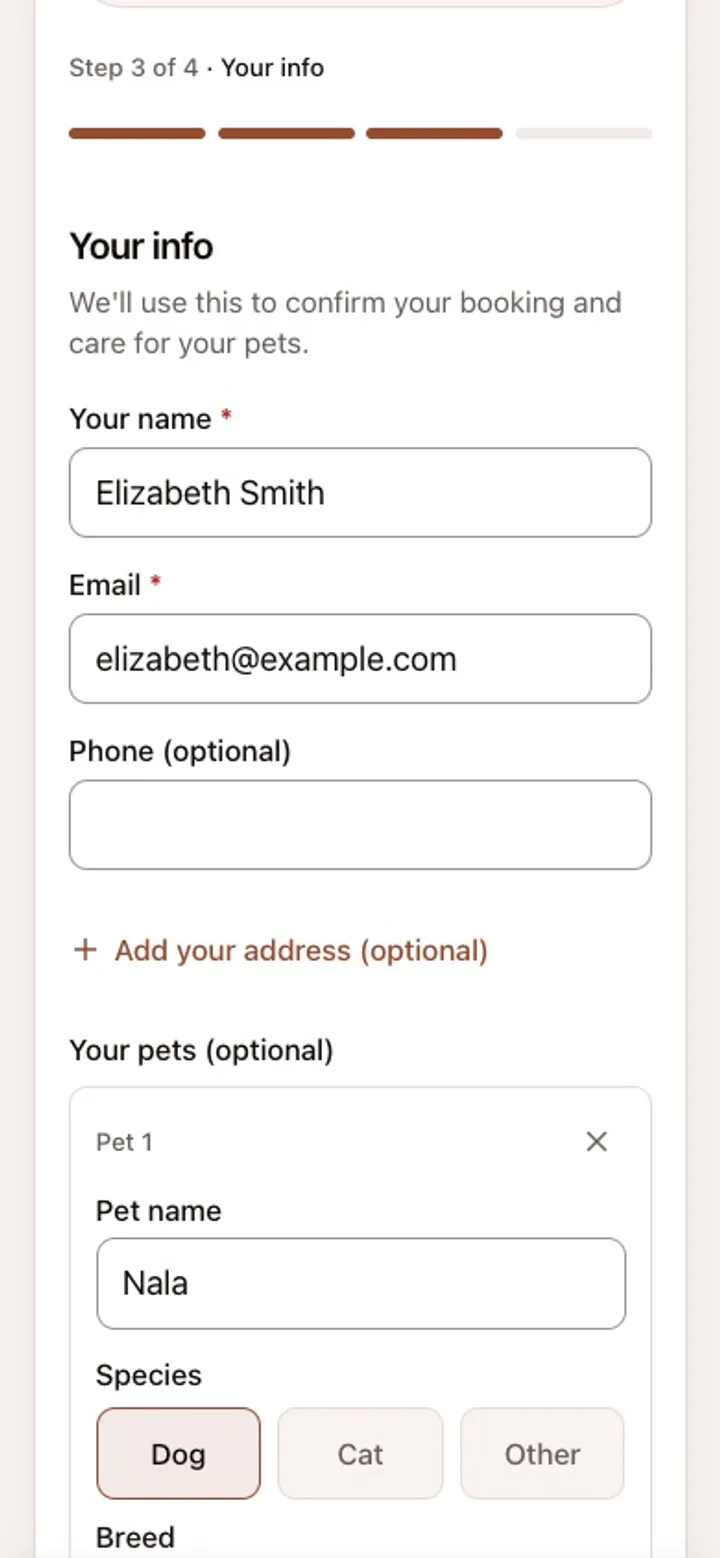
Clients who want one can have an optional account, which gives them their booking history in one place. It is a choice for the owner, not a gate in front of the booking form.
The occupancy board
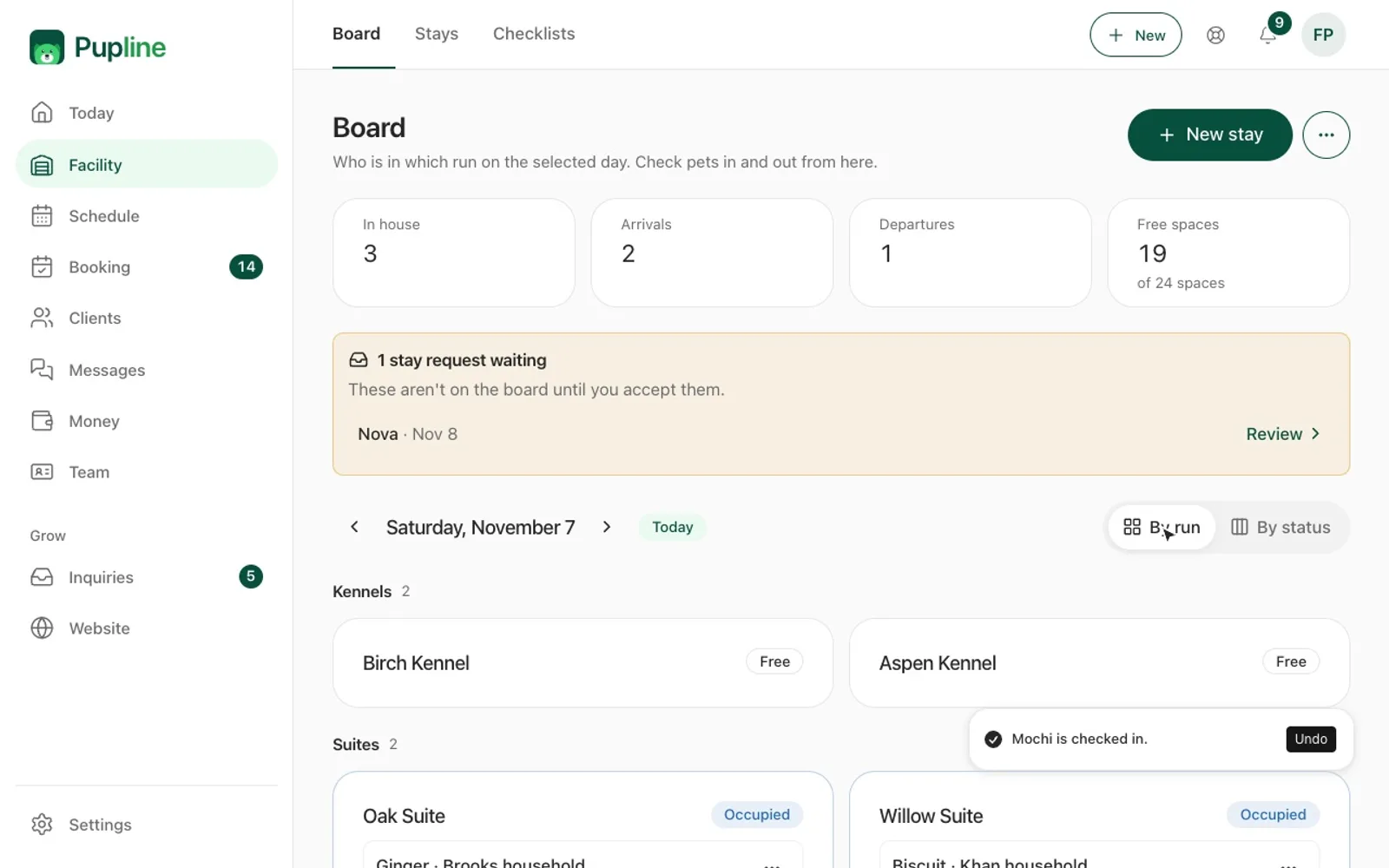
The occupancy board is the screen most kennel and daycare staff leave open all day. It shows who is in which run today, the arrivals and departures still to come, and how many free spaces you have. Your runs, suites and rooms are named and have their own capacities, so "Run 4" or "Garden Suite" means the same thing on screen as it does in the building.
Check-in and check-out are recorded with timestamps. That is useful for billing (a late pick-up is visible, not argued about) and for the record if anything is ever questioned later.
Scheduling and recurring daycare days
Daycare runs on routines. In Pupline you set a dog's recurring days once, for example Monday, Wednesday and Friday, and they appear on the schedule every week. The schedule warns you about conflicts, so you see a clash before it becomes a problem at drop-off.
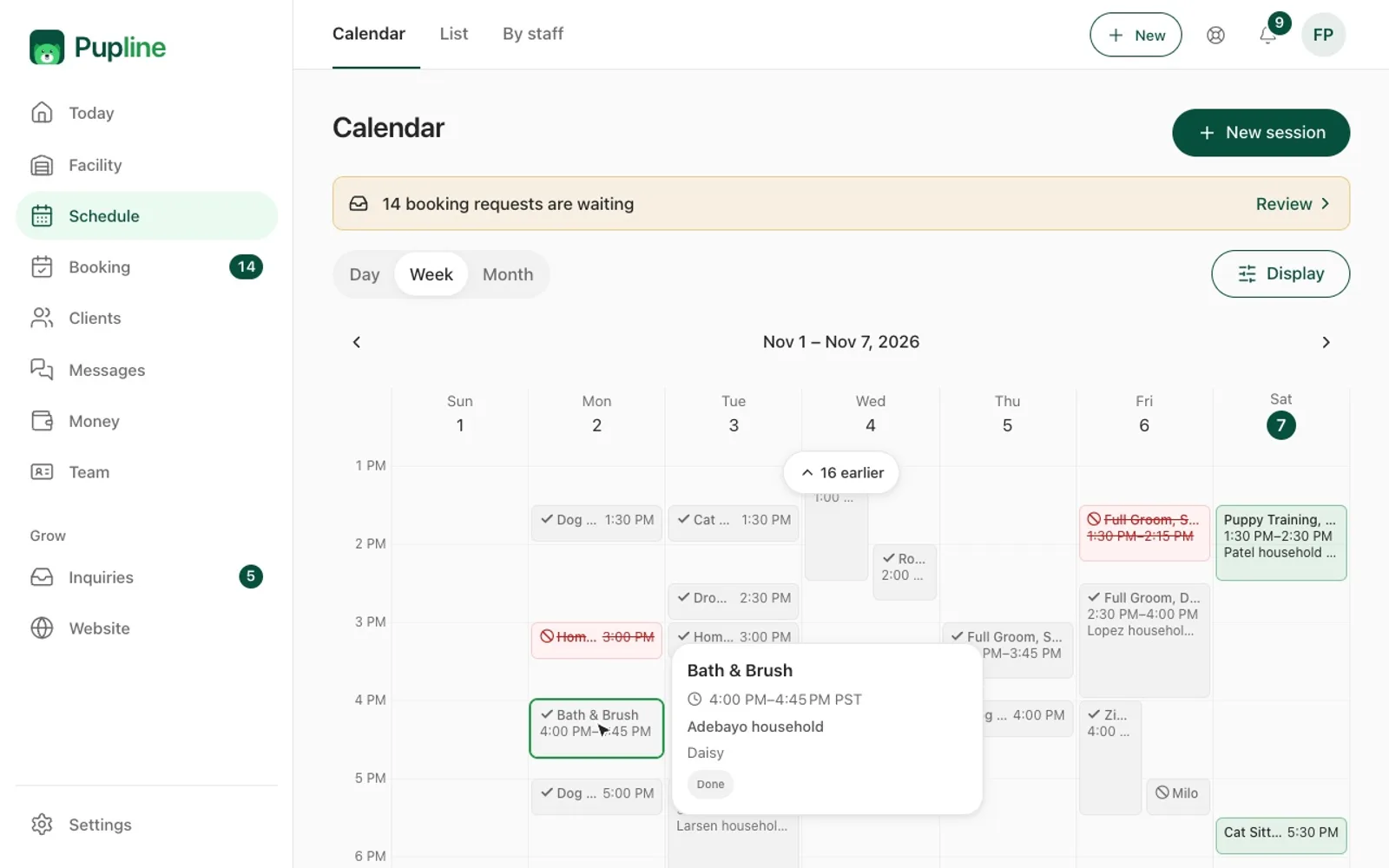
One-off bookings, boarding stays and recurring daycare all sit on the same weekly view. For a business that does both daycare and boarding, that single view replaces the wall chart and the spreadsheet.
Clients and pets
Each client is stored as a household, with all of their pets underneath. Each pet record holds medications, allergies and notes on dogs it must be kept apart from. That last field is one many systems leave to free-text notes, and it is the one your staff most need when they are building playgroups.
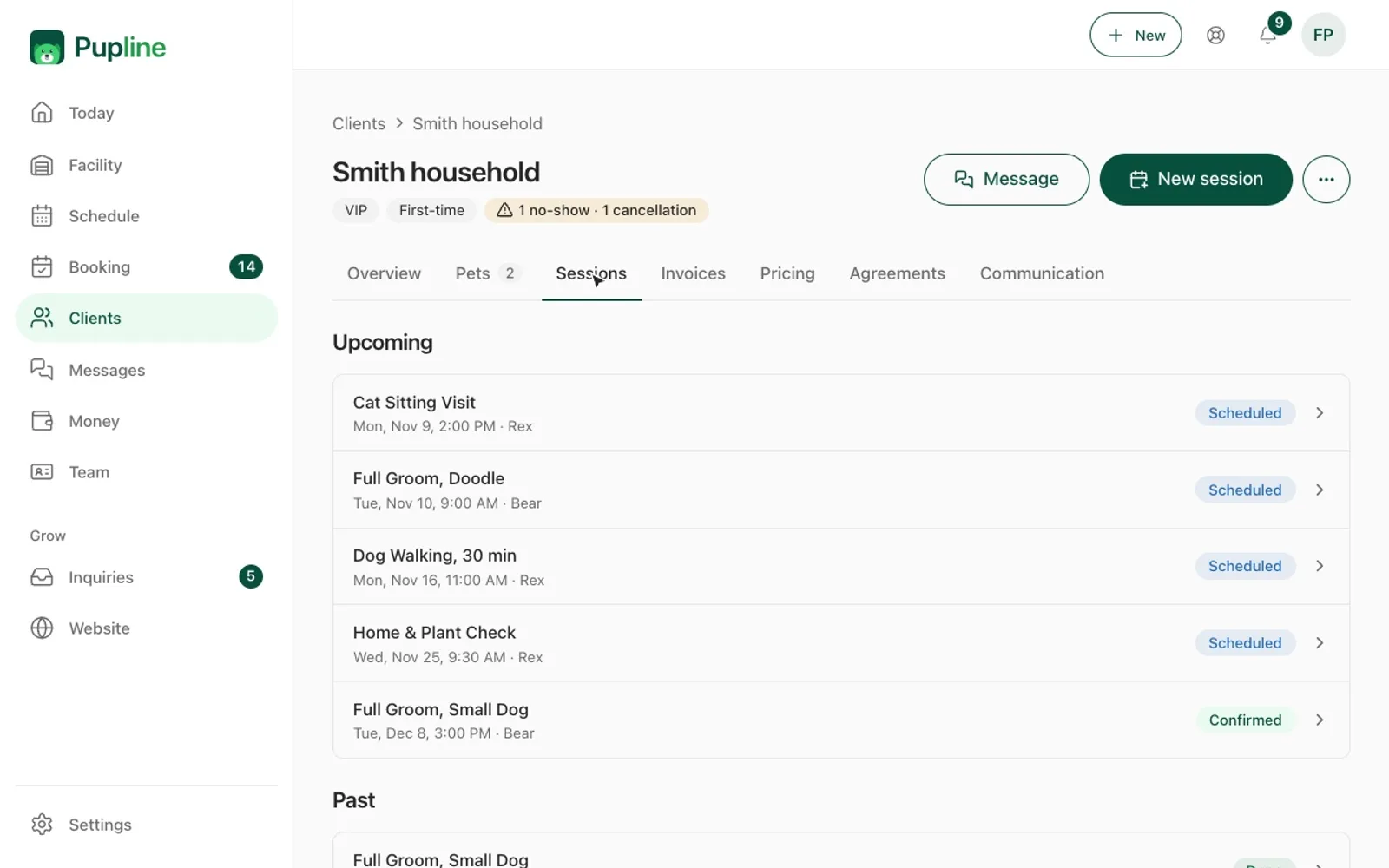
Before a stay, owners fill in a Care Card with the details for that visit. Feeding, medication and anything new since the last stay come from the owner, in writing, before the dog arrives. That moves the conversation out of the busy drop-off window.
Vaccination tracking
Pupline tracks vaccinations such as rabies, DHPP and Bordetella for each pet. It warns you before a vaccination lapses, so you can ask the owner for an updated record before the booking, not at the door. For kennels operating under licence conditions, having the expiry date on file and visible is part of the job. Our UK dog boarding licence guide and dog daycare license guide explain what inspectors typically expect to see.
Agreements and waivers
You send owners a link and they e-sign your boarding agreement or waiver from their phone. The signed copy is stored against the client. No printing, no scanning, and no "we will sign it at drop-off" that never happens.
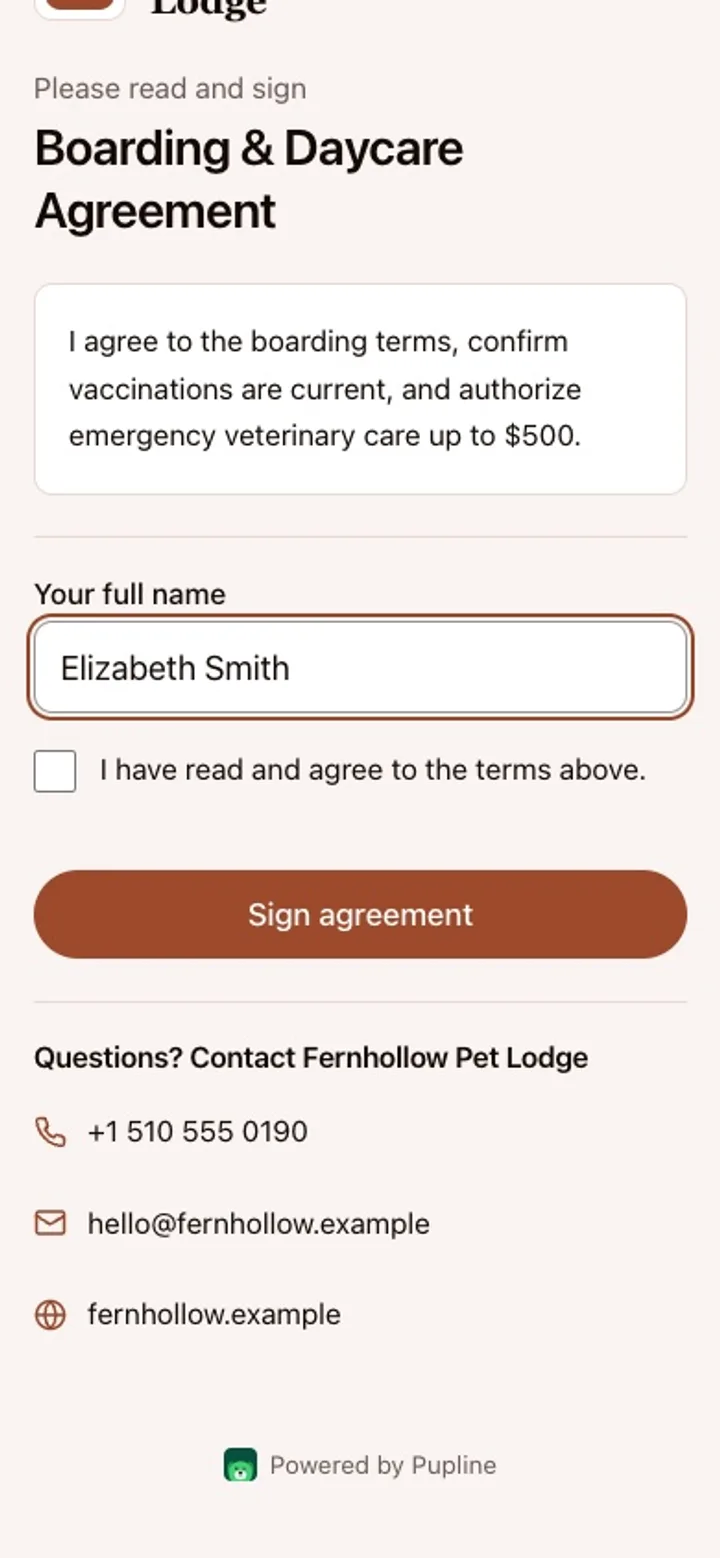
If you do not have an agreement yet, our dog boarding contract template is a good starting point to adapt and upload.
Report cards with photos and video
Report cards are where a daycare earns its repeat bookings. In Pupline staff add photos and video, pick a mood and write a short note. The owner receives a report card that looks good on a phone.
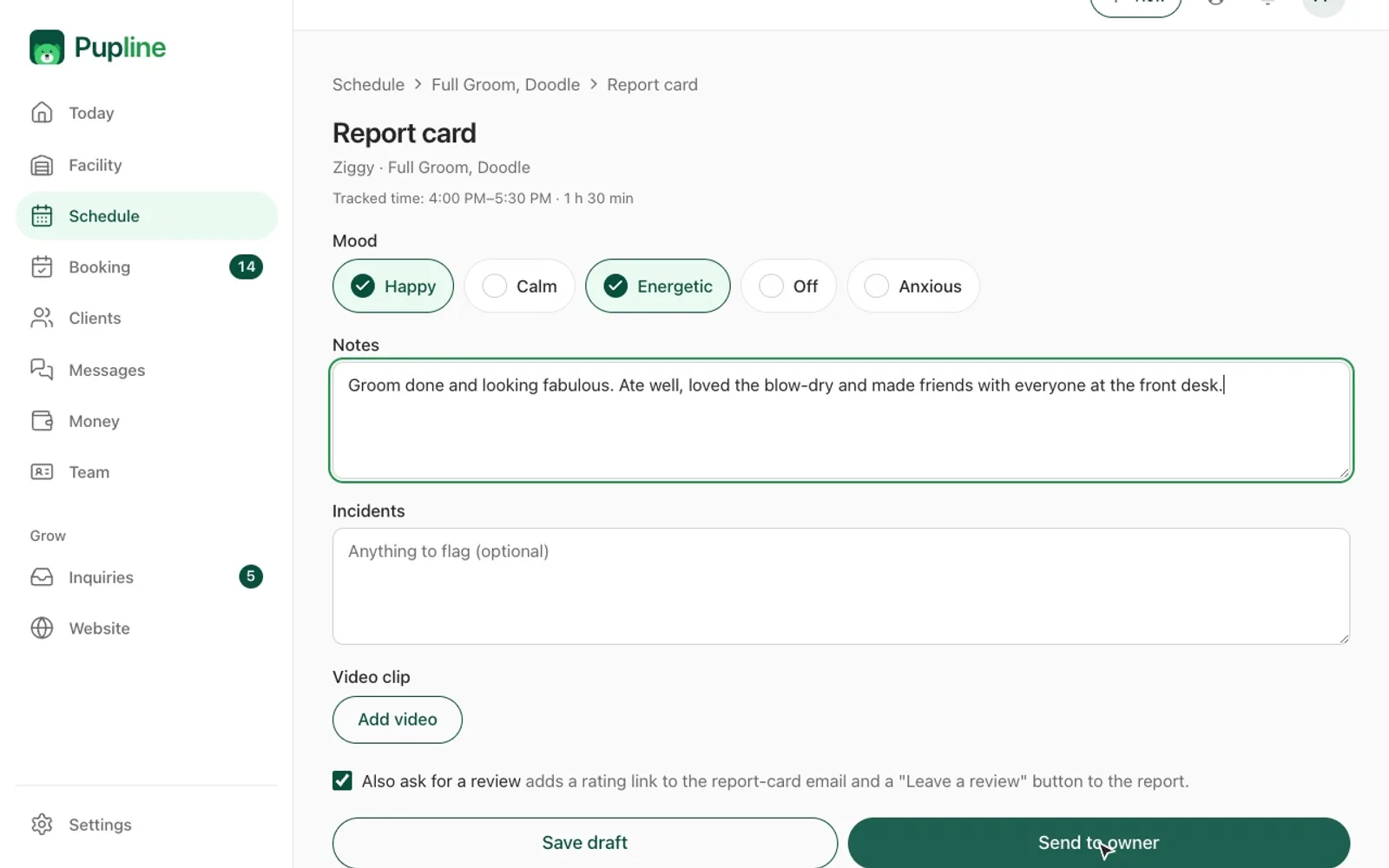
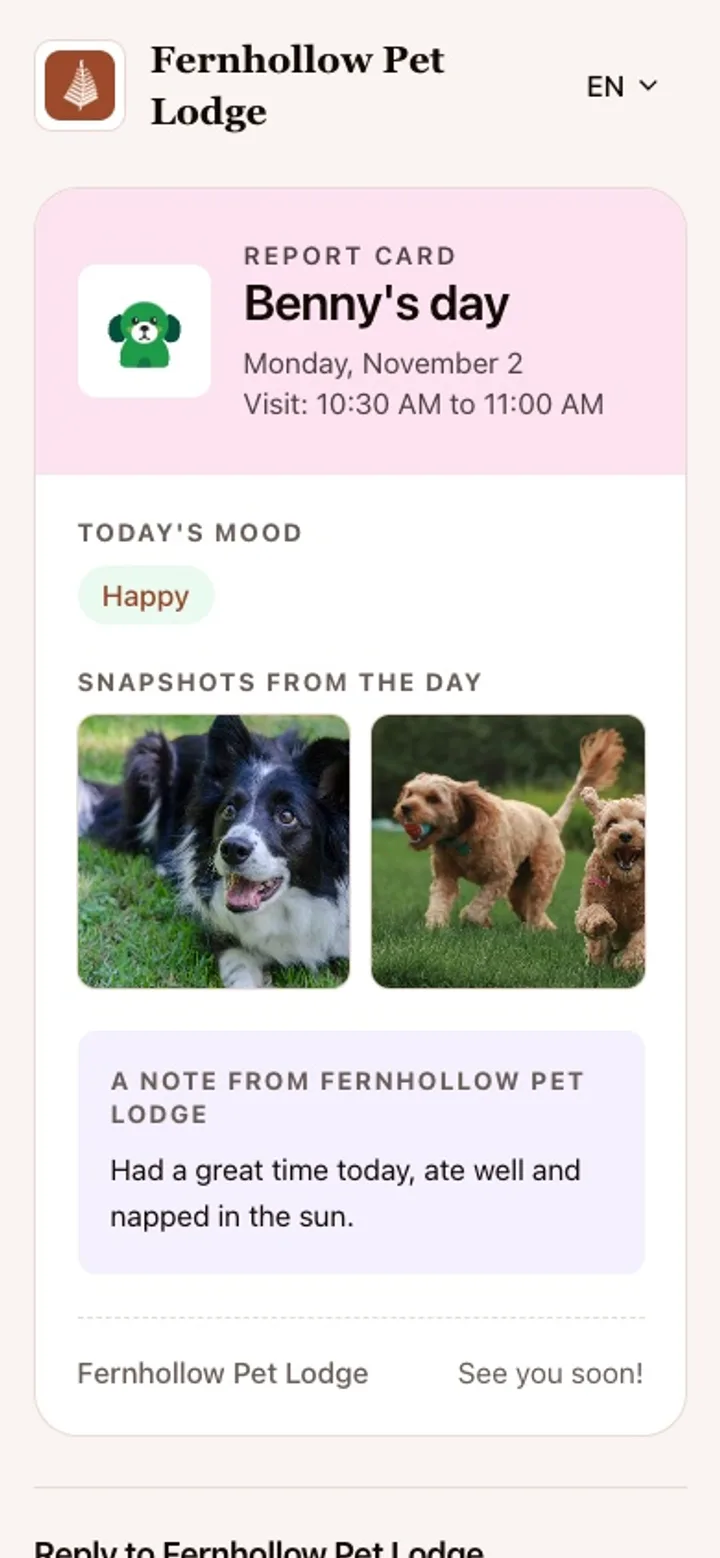
The editor is simple enough that staff can fill it in between playgroups rather than at the end of the day. For ideas on what to include, see our dog daycare report card guide.
Client communication
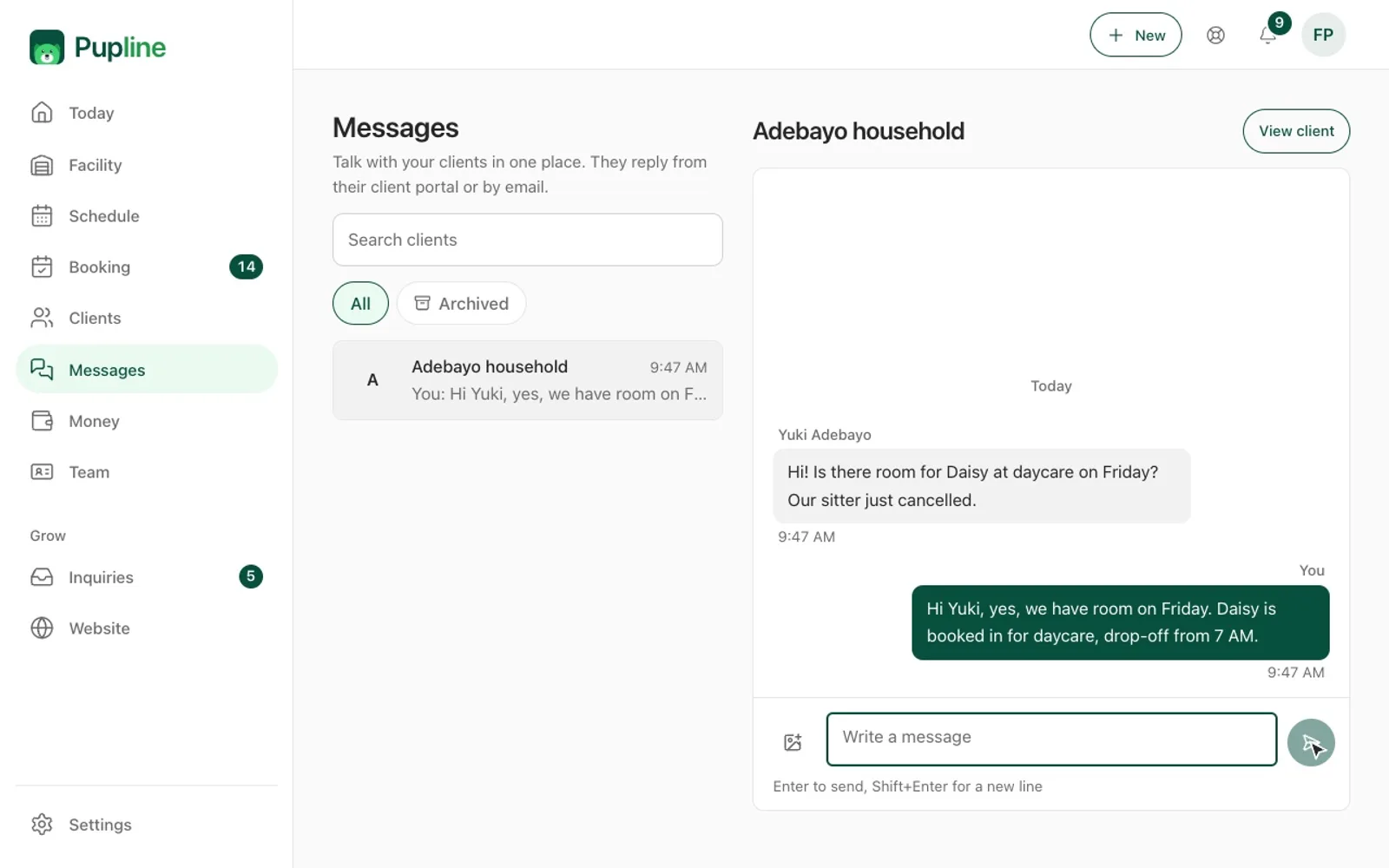
Pupline has one inbox for client messages and booking requests. Instead of booking requests in one place and questions in another, everything an owner sends lands in the same list.
Notifications go out by email and by web push. That covers booking confirmations, reminders and report cards. After a stay, Pupline can send a review request, which is the easiest way we know to build up reviews without remembering to ask.
The honest gap is SMS. Pupline has no built-in SMS or phone system, so if your clients are used to text reminders from you, they will need to get used to email and push instead. For many boarding and daycare businesses that is fine, because the messages that matter (confirmations, agreements, report cards) work well by email. For a business that relies on text reminders to reduce no-shows, it is a real trade-off.
Billing and payments
Per-night billing with peak rates
Boarding is billed per night, and Pupline handles that natively. You can set holiday or peak rates, so Christmas and summer weeks price themselves without manual edits. Extras such as a bath, extra walks or medication administration are added to the stay.
When a stay ends, the invoice is drafted from it. Invoices are branded PDFs with your logo, and the invoices list shows which are paid and which are overdue.
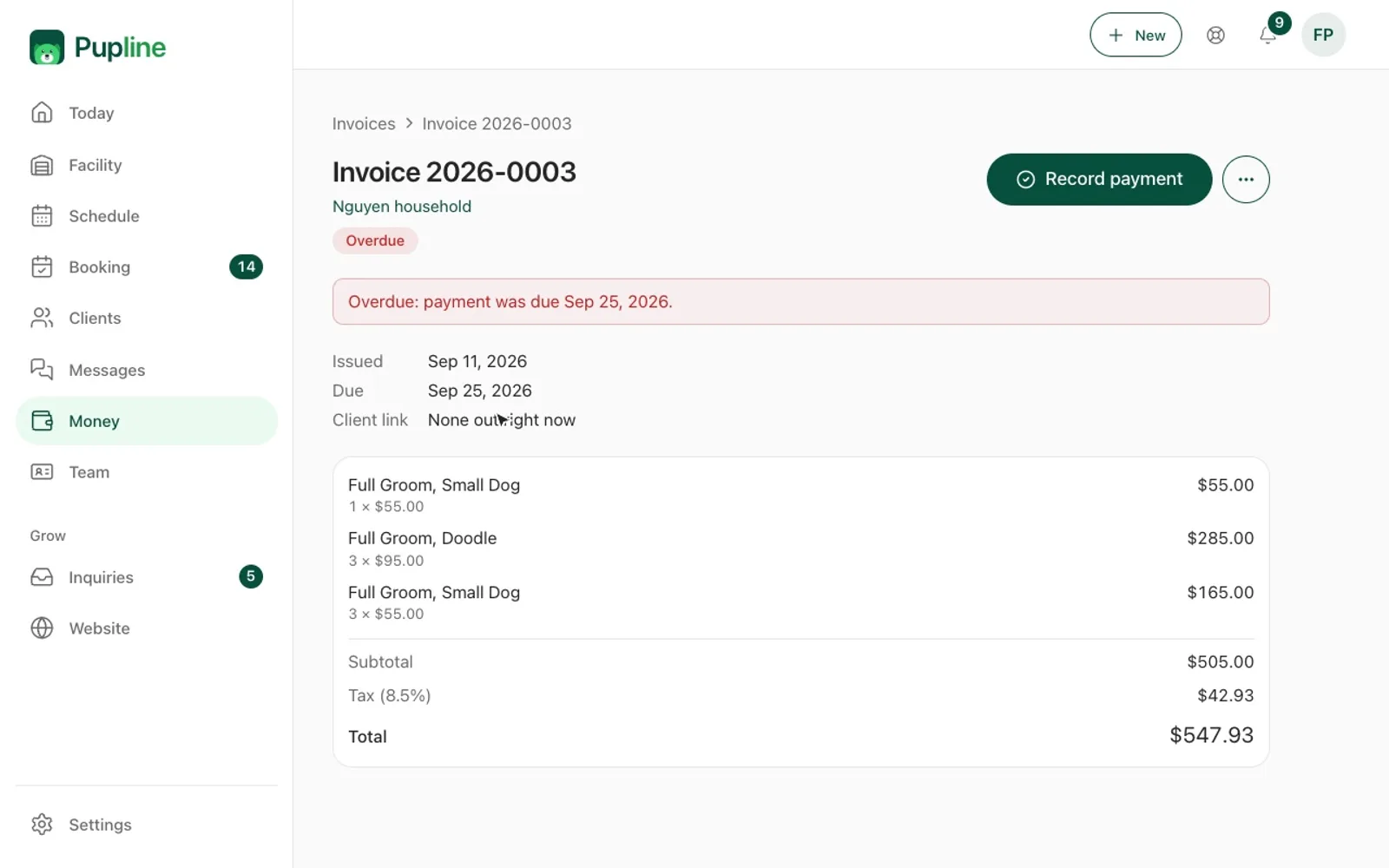
For a walk through of what a good boarding invoice contains, see our dog boarding invoice template.
Card payments and deposits through your own Stripe account
Card payments and deposits run through your own Stripe account. The money lands with you, in your account, and you are not tied to an in-house payment processor that you would have to unpick if you ever leave. Taking a deposit when you accept a booking is a simple way to protect your busiest holiday weeks from last-minute cancellations.
You can also create discounts and promo codes, for example a first-stay offer or a multi-dog discount.
Packages for trainers and daycares
Prepaid session packages are built in. A trainer can sell a block of six sessions and Pupline tracks how many are left. If you sell daycare passes, our dog daycare packages guide covers how to price them.
What Pupline does not do in billing
There is no point-of-sale or card reader. If you sell food, treats and leads over the counter in volume, you will need a separate till for retail. For a boarding kennel or daycare where retail is a small sideline, most owners take those payments through a Stripe invoice or link instead.
Tools for solo walkers, sitters, groomers and trainers
The Solo plan at $19/mo is for one person working alone. It runs the same software as the facility plans, with the tools that matter for mobile work coming to the front.
Daily route and live walk tracking
Walkers and sitters get a daily route in visit order. During a walk, the owner can follow it live on a map. For an owner at work, seeing the walk happen on a map is reassuring.
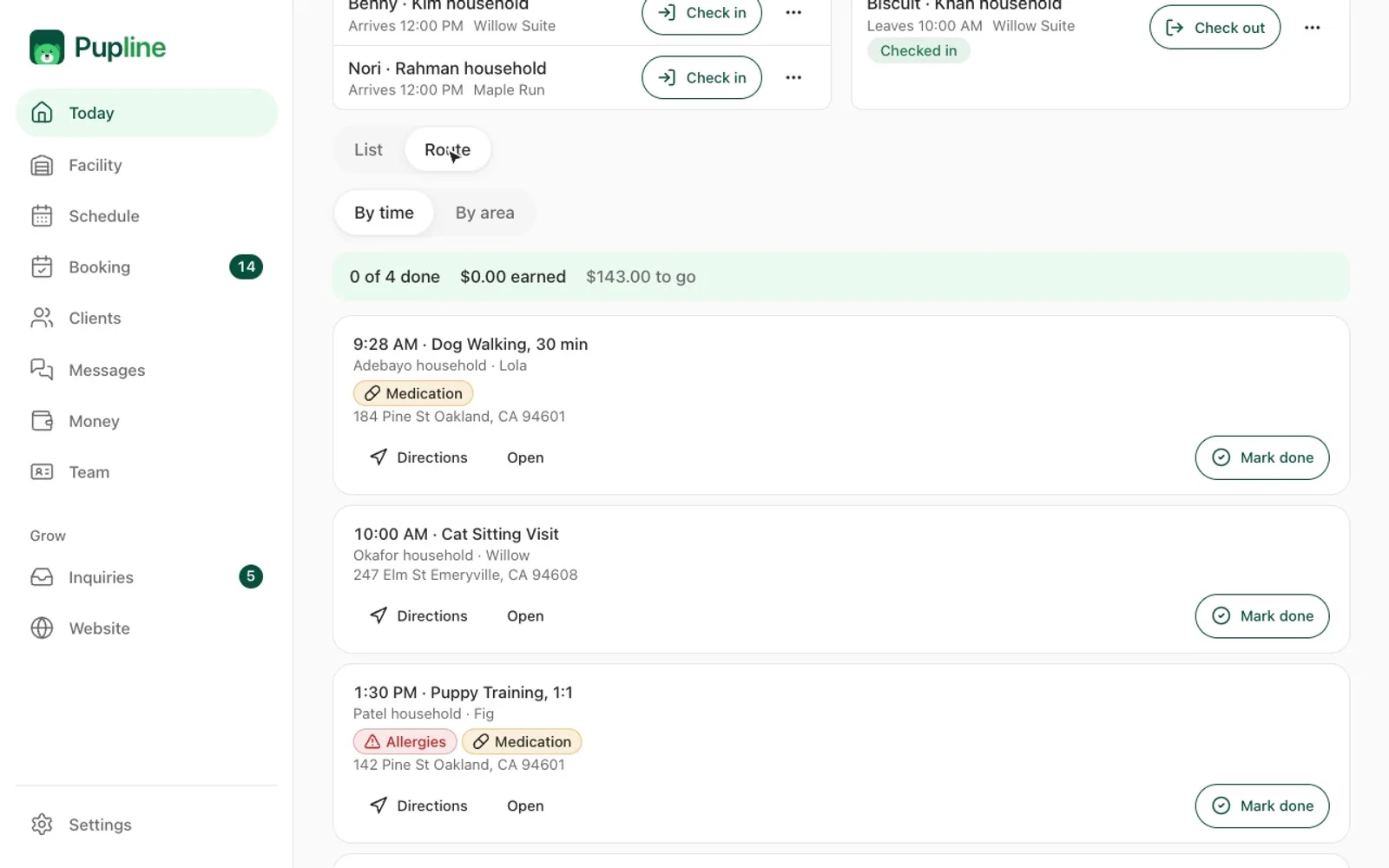
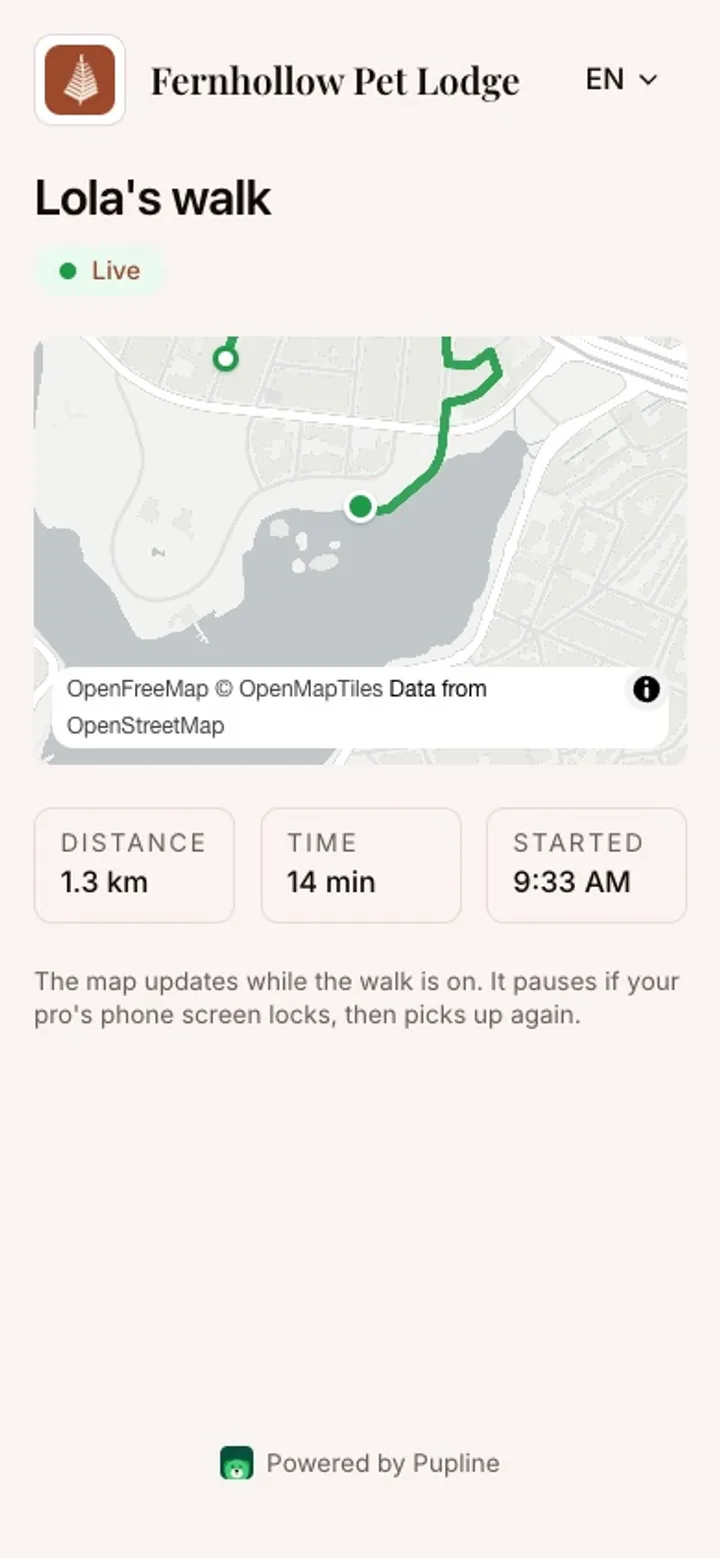
Our ranking of the best dog walking software and the best pet sitting software compares Pupline's Solo plan with the dedicated walking and sitting platforms.
Grooming service templates
Groomers can set up breed-based service templates, so the service you offer for a given breed is set up once and reused, instead of retyped for every booking. Our best dog grooming software ranking covers how that compares with grooming-first platforms such as MoeGo.
Prepaid sessions for trainers
Trainers can sell prepaid session packages and track what each client has left. Group-class enrolment is not available yet, so a trainer running classes of eight dogs will want to check our best dog training software ranking before choosing.
Your free website
Every account includes a free website at yourname.pupline.app, built from templates. You choose a template and fill in your own content. For a new business, it means you can have a web presence on day one without paying for a separate website builder.
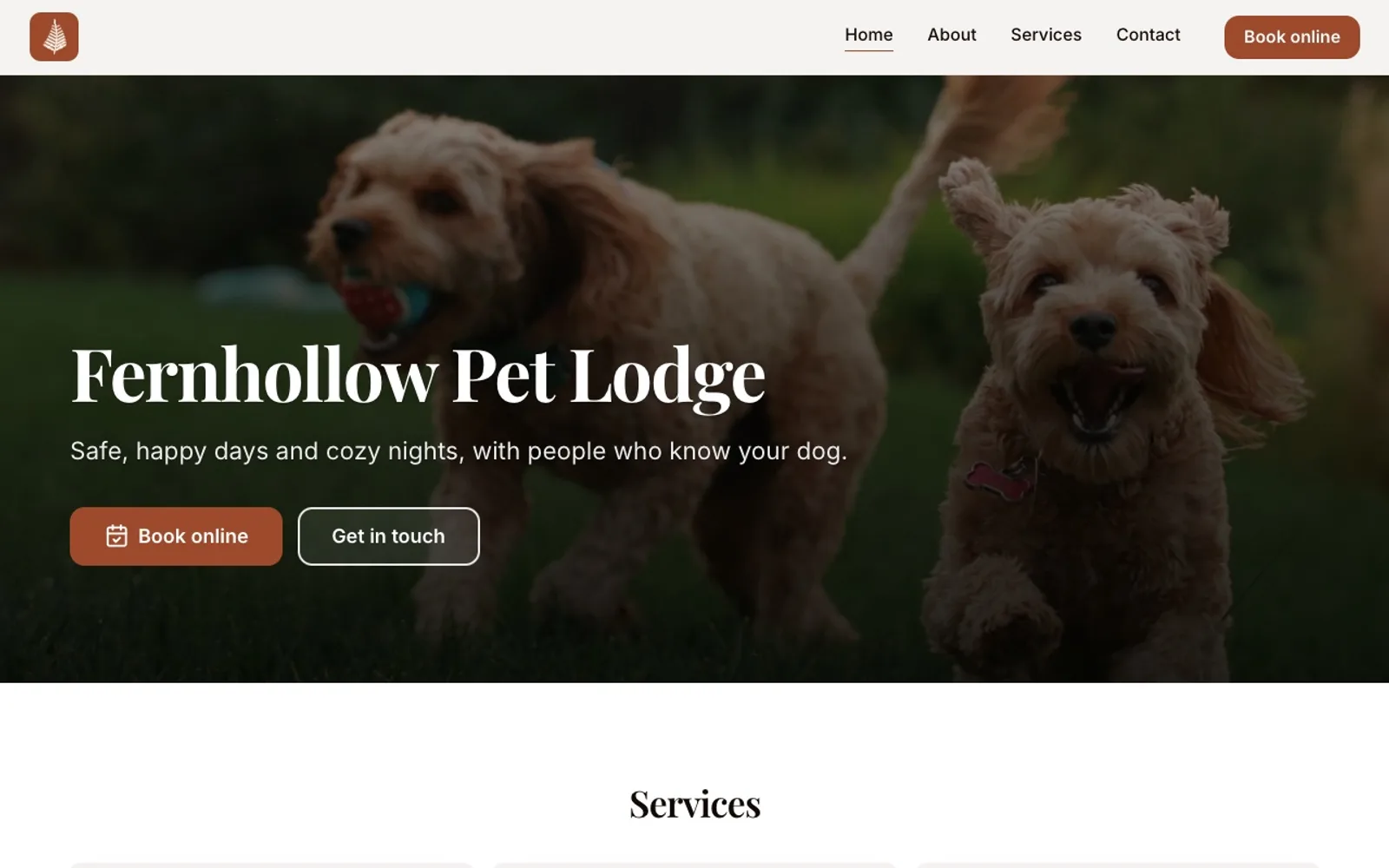
Calendar sync and the app
Pupline syncs one way to Google Calendar and Apple iCloud Calendar. Your bookings appear in the calendar on your phone, alongside your personal appointments. It is one-way, so changes are made in Pupline, not in your calendar.
Pupline runs in the browser and can be installed as a web app on a phone, tablet or computer. Once installed it opens from the home screen like any other app and receives push notifications. It is not in the App Store or Google Play, so there is no store download for staff or owners.
Ease of use and setup
Getting started
The trial is 30 days with every feature and no card. During the trial you can set up your runs, rooms and services, add a few clients and send yourself a test booking request. On facility plans, a setup call walks you through the configuration with someone from the Pupline team.
Free data migration
Switching software is the part owners dread most, so Pupline does it for you on facility plans. You send the export from your old system, and the Pupline team moves it across within 3 business days of receiving it.
The migration covers:
- Clients and their pets
- Vaccination records
- Upcoming bookings
- Prepaid package balances
- Money owed, brought across as open invoices
- Documents
That list matters. Many vendors import clients and pets but leave you to re-enter future bookings and outstanding balances by hand. Our guide to switching pet care software explains what to export from common systems and what to check after go-live.
Day-to-day use
The screens staff use most are the occupancy board, check-in and check-out, the schedule and the report card editor, and each one does a single job. Staff accounts have roles, so a weekend assistant sees what they need and not the business's finances.
Support
Facility plans include a setup call and the free migration described above. Beyond that, we do not publish support hour commitments or response time statistics, so we will not quote any here.
Screenshots
These are real screens from Pupline, captured from the product. The first eight are from the desktop view; the last four are what owners and staff see on a phone.
Pros and cons
Feature coverage across 13 features we track
Each block is one feature. Hover or tab to a block to see which features it covers.
- Pupline1111
- Gingr10111
- MoeGo121
- Time To Pet8311
| Product | Included | Partial | Paid add-on | Not offered | Not published |
|---|---|---|---|---|---|
| Pupline | Online booking, Client portal, Occupancy board / run map, Vaccination tracking, Report cards, E-signed agreements, Invoicing, Card payments, Packages / prepaid credits, Free data migration, Unlimited staff users | Mobile app | none | Built-in SMS | none |
| Gingr | Online booking, Client portal, Occupancy board / run map, Vaccination tracking, Report cards, E-signed agreements, Invoicing, Card payments, Packages / prepaid credits, Mobile app | Free data migration | Built-in SMS | none | Unlimited staff users |
| MoeGo | Online booking, Client portal, Occupancy board / run map, Vaccination tracking, Report cards, E-signed agreements, Invoicing, Card payments, Packages / prepaid credits, Built-in SMS, Mobile app, Free data migration | Unlimited staff users | none | none | none |
| Time To Pet | Online booking, Client portal, Report cards, E-signed agreements, Invoicing, Card payments, Mobile app, Free data migration | Occupancy board / run map, Vaccination tracking, Built-in SMS | none | Unlimited staff users | Packages / prepaid credits |
Source: vendor websites, pricing pages and help centers, checked November 2026. Not published means we could not verify it either way.
Pros
- Every feature on every tier, with no paid add-on modules
- Unlimited staff accounts on facility plans, priced by capacity instead of seats
- Free data migration done for you, with no setup fee
- Occupancy board, named runs and suites, check-in and check-out and per-night billing built for kennels and daycares
- Photo and video report cards, e-signed agreements and vaccination tracking with expiry warnings
- Card payments go through your own Stripe account, so the money lands with you
- Free website included at yourname.pupline.app
- 30-day free trial with no card
Cons
- No multi-location management, so chains and franchises are better served elsewhere
- No built-in SMS or phone system yet; notifications go by email and web push
- No front-desk point-of-sale or card reader for retail sales
- Runs in the browser and as an installable web app rather than a native app-store app
The pros come down to two things: predictable pricing and a complete daily core for single-site businesses. The cons come down to scope: Pupline has chosen not to be a multi-site enterprise platform, a retail till or an SMS system, at least for now.
How Pupline compares
Pupline vs Gingr
Gingr is one of the deepest platforms for daycares and boarding facilities, and the obvious choice for a multi-location group that needs central control. It is priced in tiers with paid add-ons such as texting and employee scheduling, and it is demo-only, with no self-serve trial. Pupline is the simpler, flat-priced option for a single site that does not need multi-location management, retail or SMS. Our Gingr review and the Gingr alternatives page go through the numbers.
Pupline vs Time To Pet
Time To Pet is built first for pet sitting and dog walking teams, with native apps, GPS tracking and text messaging on its Solo and Team plans, priced per active staff member. It has a separate Facility plan for daycare and boarding. For a solo walker, Pupline's Solo plan is cheaper at $19/mo, while a walking company with ten staff in the field and a need for SMS will find Time To Pet's team tools more mature. See our Time To Pet alternatives page for the full field.
Pupline vs MoeGo and Talopet
MoeGo and Talopet both lead with grooming, and both include SMS, which Pupline does not. Talopet adds an AI phone receptionist on its higher tiers. Pupline is the better fit when boarding and daycare are the core of the business and grooming is a sideline. Our MoeGo review and Talopet review cover them in depth.
| Feature | Pupline | Gingr | Time To Pet | MoeGo |
|---|---|---|---|---|
| Starting price | From $19/mo (Solo) or $99/mo (facilities) | From $100/mo (annual) or $109/mo (monthly) | From $25/mo (Lite) | From $49/mo (mobile) or $79/mo (salon) |
| Our score | 9.4/10 | 8.6/10 | 8.4/10 | 8.5/10 |
| Online booking | ✓ | ✓ | ✓Client service requests through the portal and app | ✓ |
| Occupancy board / run map | ✓ | ✓Capacity limits and kennel room management (Stay plan) | ◐Capacity and occupancy widget on the Facility plan | ✓Lodging view on boarding plans |
| Vaccination tracking | ✓ | ✓ | ◐Vaccine records and uploads in the client portal; expiry alerts not confirmed | ✓ |
| Report cards | ✓ | ✓ | ✓ | ✓Grooming reports and daily boarding report cards |
| E-signed agreements | ✓ | ✓Waivers signed through PreCheck | ✓Client service agreements signed in the portal | ✓ |
| Built-in SMS | ✕ | +$2-way SMS $165/yr plus usage over 500 incoming texts; bundle $225/yr | ◐Text messaging on Solo and Team, not Lite | ✓200 to 1,350 SMS included per van or location |
| Multi-location | ✕ | ✓Enterprise plan | – | ✓Multi-location sync on Growth and up |
| Point of sale | ✕ | ✓Retail management on every plan; terminals via Gingr Payments | ◐Terminal and Tap to Pay; Stripe Terminal on Facility | ✓ |
| Free data migration | ✓Done for you on facility plans | ◐Free import if you fill Gingr's template; done-for-you import is paid | ✓Clients, pets, staff and vets from CSV; not schedules or invoices | ✓Free data transfer per MoeGo's FAQ |
| Unlimited staff users | ✓On all facility plans | – | ✕Charged per active staff member | ◐Growth plan and up; Basic is 1 to 2 members |
Frequently asked questions
How much does Pupline cost?
As of November 2026, Pupline costs $19/mo on the Solo plan for one person working alone, or $190 a year. Facility plans are priced by pet spaces: Small up to 25 spaces is $99/mo, Standard up to 75 spaces is $199/mo, and Large with unlimited spaces is $299/mo. Annual billing gives two months free and there is no setup fee.
Does Pupline have a free trial?
Yes. Pupline has a 30-day free trial with every feature switched on, and you do not need to enter a card to start it. You can set up your runs, services and clients during the trial, and on facility plans the team can migrate your data from your old system for free.
Does Pupline charge per staff member?
No. Facility plans include unlimited staff accounts with roles, and the price is set by your number of pet spaces, not by logins. The Solo plan is for one person working alone. Adding seasonal or part-time staff to a facility account does not change the monthly bill.
Can Pupline move my data from my current software?
Yes, on facility plans the Pupline team does the migration for free. It covers clients, pets, vaccinations, upcoming bookings, prepaid package balances, money owed as open invoices, and documents. The turnaround is within 3 business days of receiving the export from your current system.
Does Pupline send text messages?
Not yet. Pupline has no built-in SMS or phone system. Booking confirmations, reminders and report cards go to owners by email and web push notifications instead. If text reminders are central to how you run your business, weigh that before switching.
Is there a Pupline app?
Pupline runs in the browser and can be installed as a web app on phones, tablets and computers, where it opens from the home screen and receives push notifications. It is not listed in the Apple App Store or Google Play as a native app.
Can Pupline manage more than one location?
No. Pupline does not offer multi-location management, so it is built for single-site businesses. A group running several daycares or kennels that needs central reporting across sites should look at an enterprise platform such as Gingr instead.
Final verdict
Pupline does one thing deliberately: it gives a single-site daycare, kennel or cattery every feature it needs for the daily work, at a flat price set by capacity, with the migration done for you. The occupancy board, per-night billing with peak rates, vaccination warnings, e-signed agreements and report cards cover the work that fills an owner's day. Solo walkers, sitters, groomers and trainers get the same software for $19/mo.
The limits are equally clear. If you need multiple locations, SMS, a retail till, a native app-store app or group-class enrolment, Pupline is not the right choice today, and our best kennel software and best cattery software rankings will point you to platforms that do those things. If none of those are deal-breakers, the 30-day trial costs nothing and needs no card, which is the best way to find out.
Try Pupline freeSources
Keep reading
- Best softwareThe Best Dog Daycare Software in 2026
- ReviewsDaySmart Pet Review 2026: The Former 123Pet, Explained
- ReviewsTalopet Review 2026: Is the AI Receptionist Worth It?
- Best softwareThe Best Dog Grooming Software in 2026
- AlternativesThe Best DaySmart Pet Alternatives in 2026
- AlternativesThe Best Gingr Alternatives in 2026