Dog Daycare Report Cards: Free Template and Example Wording
What to put on a doggy daycare report card, how to word it honestly, a printable template for daycare and boarding, and how to make photos that owners share.
This site is published by the team behind Pupline, our top pick. Who we are
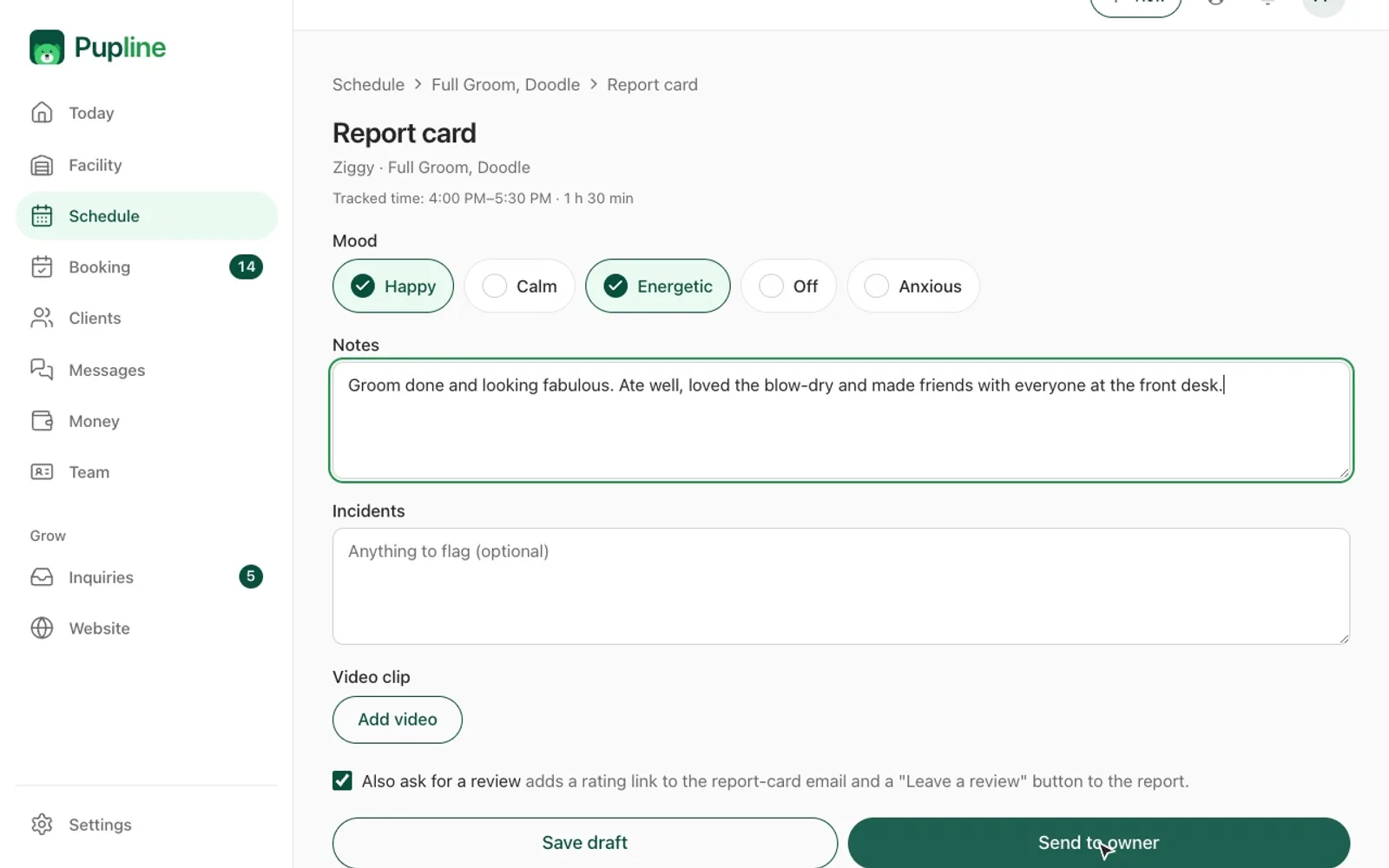
A dog daycare report card is a short note, usually with a photo, that tells an owner how their dog's day went: who they played with, how they ate and rested, and anything the owner should know. Done well, it is the cheapest marketing a daycare or kennel can do, because owners share it, remember it and come back. This guide covers what to include, example wording for good days and difficult ones, a printable doggy daycare report card template, a dog boarding report card version, and practical photo and video tips.
Why report cards matter
Owners who leave their dog at daycare spend the day wondering what is happening. A report card answers that question, and it does three useful jobs for your business at the same time.
First, it builds trust. An owner who sees a photo of their dog resting happily after a morning of play is far less likely to worry, complain or shop around.
Second, it creates a record. If a dog starts limping, eating less or getting grumpy with other dogs, a run of report cards shows when it started. That history is useful for the owner's vet and for you, especially if your license or insurer expects behavior records. In England, for example, Defra's dog day care guidance requires every dog to be screened before admission and the screening to be recorded, and it expects a register with each dog's medical and behavioral history. A report card is not a substitute for that register, but it feeds it.
Third, it markets your business. Owners post report card photos to social media and send them to their partners and friends. Every one of those shares carries your name to exactly the kind of people who might need daycare.
What to include on a dog daycare report card
Keep it short enough to fill in for every dog, every day. Most daycares settle on a handful of sections.
The basics
- Dog's name and date
- Staff member who wrote it
- Drop-off and pickup times
- Playgroup or room
Mood and energy
A quick read on how the dog seemed when they arrived and through the day. Use a simple scale, such as calm, happy, playful, very excited, shy or tired.
Play and social behavior
Who they played with, what kind of play they enjoyed (chase, wrestling, fetch, sniffing around, people time), and how they got on with the group. This is the section owners care about most, and the one where specific details make the biggest difference.
Eating and drinking
If you feed lunch, note how much was eaten. Note if the dog drank well, especially on hot days.
Rest
How long the dog napped and where. Owners are often reassured to hear their dog rested, because it shows the day was not one long frenzy.
Potty breaks
A simple tick for normal, plus a note if anything was unusual, such as loose stools. Keep the wording factual and kind.
Health and incidents
Any small scratches, limping, coughing, vomiting or other concerns, what you did about it, and whether the owner should keep an eye on it or see a vet. If an incident needs a separate incident report under your policies, say on the card that a member of staff will talk to them at pickup.
Highlights and a photo
One or two lines that capture the dog's personality, plus at least one photo. This is what gets shared.
Example wording for report cards
Generic phrases like "had a great day" are fine as a headline, but they do not prove anyone watched the dog. The examples below show how to add a specific detail that makes the card feel personal. Swap the names and details for your own.
Great days
- "Biscuit spent the morning racing around with Luna and Teddy and then claimed the big bed by the window for a long nap. Big smiles all round."
- "Ollie was a little unsure at drop-off but warmed up within 20 minutes. By lunch he was playing tug with his new friend Pepper."
- "Rosie is the queen of fetch. She brought the ball back to every member of staff at least once and then supervised the puppies from the bench."
- "Max was very polite at lunch and finished every bite. He had two good naps and went home relaxed."
Calm or quiet days
- "Lola had a calmer day today and preferred sniffing the yard and cuddles with staff over group play. She ate well and rested in the afternoon."
- "Duke was happy to watch the action from the side today. We gave him some one-to-one time with a puzzle toy, which he loved."
Quiet days are normal, especially for older dogs or after a busy weekend. Say so, so the owner does not worry.
Days with something to report
Be clear, be factual and give a next step. Do not blame other dogs or the owner, and do not guess at medical causes.
- "Bella had a small scratch on her left ear after play this afternoon. We cleaned it and she was comfortable. Please keep an eye on it and let us know if it looks red or sore."
- "Charlie had loose stools twice today. He was otherwise bright and playing normally. If it continues tomorrow, you may want to check in with your vet."
- "Milo coughed a few times this afternoon. We moved him to a quiet room to rest away from the group. Please let your vet know, and we ask that he stays home until he has been cough-free for a few days."
- "Rocky was a bit too pushy with the smaller dogs today, so we moved him to the larger playgroup, where he settled well. We'll keep him in that group for now."
If you need a follow-up conversation, say so on the card: "Our manager will give you a quick call this evening about today." Then make that call.
Phrases to avoid
- "Aggressive" on a written card, unless it follows a proper assessment. Describe the behavior instead, such as "growled when another dog approached his toy".
- "Perfect angel" every single day. It stops meaning anything.
- Vague warnings like "had some issues today". The owner will imagine the worst.
- Medical diagnoses. You are not the vet. Describe what you saw and suggest they check with their vet.
Printable doggy daycare report card template
Print this on half-sheets or A5 cards, or copy the fields into a digital form. Tick the boxes that apply and add a sentence or two in the notes.
Doggy daycare report card
Free to copy and adapt. Use your browser's Print to save as PDF.[Daycare name] | Daily report card
- Dog: [Name]
- Date: [Date]
- Written by: [Staff name]
- Drop-off: [Time] | Pickup: [Time]
- Playgroup: [Small, medium, large, seniors, puppies]
Mood today
- Calm
- Happy
- Playful
- Very excited
- Shy at first
- Tired
Play
- Played with: [Dog names]
- Favorite activity: [ ] Chase [ ] Wrestling [ ] Fetch [ ] Sniffing [ ] People time [ ] Toys
- Got along with the group: [ ] Great [ ] Good [ ] Needed some breaks
Food and water
- Lunch: [ ] All [ ] Some [ ] None [ ] Not fed today
- Drinking: [ ] Normal [ ] More than usual [ ] Less than usual
Rest
- Nap time: [Approximate length]
Potty
- Normal [ ] Loose stools [ ] Other: [Details]
Health and notes for you
- Nothing to report
- Please read: [Details and next step]
Today's highlight
[One or two sentences]
Photo
[Attach or print photo here]
Dog boarding report card template
Overnight guests need a slightly different card, because owners want to know about sleep, appetite over several days and how the dog is settling. Many kennels send a short update daily and a fuller card at checkout.
Dog boarding report card
Free to copy and adapt. Use your browser's Print to save as PDF.[Kennel name] | Stay report
- Dog: [Name]
- Stay: [Check-in date] to [Check-out date]
- Run, suite or room: [Name]
Settling in
- First night: [ ] Settled quickly [ ] Took a little while [ ] Unsettled, details: [Details]
- Overall: [ ] Very relaxed [ ] Relaxed [ ] Some homesickness
Eating (tick each day)
| Day | Breakfast | Dinner | Notes |
|---|---|---|---|
| [Day 1] | [All, some, none] | [All, some, none] | [Notes] |
| [Day 2] | [All, some, none] | [All, some, none] | [Notes] |
| [Day 3] | [All, some, none] | [All, some, none] | [Notes] |
Medication
- Given as instructed: [ ] Yes [ ] Not applicable
- Notes: [Details]
Exercise and play
- Walks or play sessions per day: [Number]
- Favorite thing: [Details]
- Friends: [Dog names, if in group play]
Sleep
- Slept well every night
- Restless on [night], details: [Details]
Extras
- Bath [ ] Nail trim [ ] Extra cuddle time [ ] Other: [Details]
Anything you should know
[Details and next steps, or "Nothing to report"]
Message from the team
[Short personal note]
Pair the boarding report card with your checkout invoice. A friendly summary right next to the bill makes the bill much easier to accept. Our dog boarding invoice template shows how to lay that out.
Photo and video tips that make report cards shine
The photo is the part owners open first and share most. You do not need a professional camera, just a phone and a few habits.
Get the face
Owners want their dog's face, with eyes in focus. Get down to the dog's eye level, tap the screen to focus on the eyes, and wait for a relaxed expression. A squeaky toy or a quiet whistle just above the phone gets you a head tilt and ears up.
Use light, not flash
Shoot near a window or outdoors in open shade. Flash makes eyes glow and startles some dogs. Dark dogs are the hardest, so photograph them against a lighter background and in bright, soft light.
Clean the background
Move a step to the side to lose a bin, a mop or a hose from the frame. A plain wall, grass or the dog's bed works better than a busy room. If you have a branded backdrop or a spot with your logo, use it for some shots, but not all, because owners get tired of the same picture.
Shoot short video, not long video
Five to ten seconds of a dog bounding across the yard or doing zoomies is plenty. Hold the phone steady, keep the dog in the middle of the frame, and stop recording before the action ends. Mute or check the audio, because staff chatter in the background rarely helps.
Plan photo time into the day
The biggest reason report cards go out without photos is that nobody had time. Assign one staff member to take photos for each playgroup for a few minutes mid-morning, while dogs are still fresh and the light is good. Keep a list of who has been photographed so no dog is missed.
Respect privacy and permission
Only share photos on social media with the owner's permission, and avoid shots that show other clients' faces or your security setup. A photo consent tick box on your dog boarding contract or daycare waiver covers this.
How to fit report cards into a busy day
Writing 40 report cards at 5pm, while owners queue at the desk, does not work. Spread the work through the day instead.
- Morning: note who arrived, mood at drop-off and the playgroup.
- Midday: record lunch, take photos and jot one highlight per dog.
- Afternoon: add rest and anything to report.
- Before pickup: a lead or manager checks the cards that mention health or behavior, then they go out.
A shared checklist on a tablet, or the kennel card on each run for boarding dogs, keeps the notes in one place as the day goes on. If staffing is tight, our guide to dog daycare staff ratios covers how to plan supervision so there is time for these jobs.
How software automates report cards
Paper and messaging apps work for a small daycare, but they have limits. Photos end up on staff members' personal phones, cards go to the wrong owner, and there is no history to look back on when an owner asks "has she been eating less lately?"
Pet care software solves most of this. Staff fill in a short form on a tablet or phone, attach photos or video, and the card goes to the right owner at pickup, saved against the pet's record. Pupline, for example, includes photo and video report cards on every plan, and it can send owners a review request after a stay, which is a natural follow-up to a happy report card. Notifications go out by email and web push rather than SMS, because Pupline does not have built-in text messaging, so check that suits your clients. Our roundups of the best dog daycare software and the best dog boarding software compare report card features across the main systems.
Report cards also make your daycare packages easier to sell. Owners who see what their dog does each day understand the value of a regular schedule, which is the core idea behind good dog daycare packages.
Frequently asked questions
What is a dog daycare report card?
A short daily summary for the owner of how their dog's day at daycare went. It usually covers mood, who they played with, eating, rest, potty breaks and any health or behavior notes, plus a photo. Owners use it to feel connected to their dog's day, and daycares use it to build trust and repeat business.
What should I write on a doggy daycare report card?
Write one specific detail that proves you watched the dog, such as a play friend or a favorite toy, plus quick notes on eating, rest and mood. If anything needs attention, describe what you saw, what you did, and what the owner should do next. Keep it warm, factual and short.
How do I tell an owner their dog had a bad day?
Stick to facts and give a next step. Describe the behavior, not a label, explain what you did, and say what happens next, such as moving playgroups or a quick call from the manager. Avoid blaming other dogs, avoid medical guesses, and follow up in person or by phone for anything serious.
Should dog boarding kennels send report cards?
Yes. Boarding owners are away for days and worry more than daycare owners. A short daily update with a photo, plus a fuller report at checkout covering eating, sleep, medication and play, reduces anxious calls and makes owners far more likely to book again.
How many photos should a report card include?
One great photo is enough for most days, and two or three is plenty. Owners care most about a sharp, well-lit shot of their dog's face. A short five to ten second video of play is a nice extra once or twice a week, but quality matters far more than quantity.
Can report cards be automated?
Partly. Software can attach photos, fill in standard fields like attendance and lunch, and send the card to the right owner at pickup automatically. The personal sentence still needs a human, but it only takes a few seconds per dog when the rest of the card is filled in for you.
Sources
Keep reading
- GuidesDog Boarding Business Plan: A Full Outline With a Worked Example
- GuidesDog Boarding Contract Template and Dog Daycare Waiver
- GuidesDog Boarding Invoice Template: Free to Copy, With Tax Notes
- GuidesDog Boarding Licence UK: The Complete 2026 Guide
- GuidesDog Boarding Prices in 2026: What a Night Really Costs
- GuidesDog Daycare Intake Form: Free New Client Template