Kennel Card Template: What to Put on a Dog Kennel or Run Card
A kennel card tells every staff member, at a glance, who is in the run, what they eat, what medication they need and what to watch for, and here is a template you can print today.
This site is published by the team behind Pupline, our top pick. Who we are
A kennel card is a printed card fixed to the front of a dog's kennel, run or suite that shows who the dog is and how to care for them during the stay. Boarding kennels, daycares, vet clinics and shelters all use them, sometimes calling them run cards, cage cards or door cards. This guide explains what to put on a dog kennel card, how to lay it out so busy staff actually read it, gives you a free printable kennel card template and a daily care log, and covers the digital alternatives.
What a kennel card is for
Most mistakes in boarding happen at handovers. The morning shift knows that the beagle in run 6 needs a tablet with breakfast, but the weekend relief worker does not. The owner said the spaniel cannot have chicken, but that was mentioned at drop-off to someone who has since gone home.
A kennel card puts the essentials where they are needed: on the run, in front of whoever is opening the door. It does not replace your client records. It is a summary that makes sure the right dog gets the right food, the right medicine and the right handling, every time.
Kennel cards also help with the record keeping many licensing regimes expect. In England, for example, Defra's kennel boarding guidance expects a register for each dog covering arrival and departure dates, microchip number, owner and emergency contacts, vet details, vaccination dates and medical history, and says records must be kept for at least 3 years. A daily care log attached to the kennel card is an easy way to capture what was actually done during the stay. For more on licensing, see our UK dog boarding licence guide and our guide to dog daycare license requirements in the US, Canada and Australia.
What to put on a dog kennel card
The best kennel cards follow a strict order: who, danger, food, medicine, routine, dates. Here is what goes in each part.
1. Identity
- Dog's name, large and easy to read from a few steps away.
- Photo. This is the single most useful addition. It stops mix-ups between two black Labradors or two dogs called Bella.
- Breed, color, sex and neutered status.
- Age or date of birth.
- Microchip number (often on the back or in the system rather than the front).
- Run, suite or room the dog is assigned to.
- Household. If siblings share a run, list both dogs on the same card.
2. Alerts
This section should be impossible to miss. Use a colored band or sticker as well as text.
- Allergies (food and medical).
- Medical conditions, such as epilepsy, diabetes or heart conditions.
- Behavior alerts, such as "nervous of men", "guards food bowl", "escape artist, double-check latch", or "no group play".
- Dogs to keep apart, by name and run.
- Handling notes, such as "lift with both arms, bad back" or "use slip lead, slips harness".
3. Feeding
- Food brand and type (owner's own or yours).
- Amount per meal, in cups, grams or scoops.
- Meal times.
- Treats allowed or not.
- Any special prep, such as soaking kibble or adding a topper.
4. Medication
- Drug name and strength.
- Dose and how it is given (with food, pill pocket, liquid).
- Exact times.
- Where the medication is stored.
- A reminder to sign the daily log each time.
5. Routine and permissions
- Walks or play sessions per day.
- Group play: yes or no, and which group.
- Off-lead consent, if your area or license requires written consent.
- Comfort items, such as their own bed or a toy that must go home with them.
- Grooming or extras booked, such as a bath before checkout.
6. Stay details
- Check-in date and time.
- Check-out date and time.
- Who is collecting, if different from the owner.
What to leave off the front of the card
Kennel cards hang where other clients, visitors and contractors can sometimes see them. Keep the owner's home address, phone number and payment details in your system or on a folded back section, not printed on the front. Staff who need the emergency contact can look it up in seconds in your booking system or in the office file.
Color coding that works
A color code lets staff see risk from across the room. Keep it simple, use the same colors everywhere (cards, collars, door clips), and post the key in the kitchen and staff room. Here is a common scheme you can adapt.
| Color | Meaning | Example |
|---|---|---|
| Red | Handle with care or no group play | Reactive to other dogs, bite history, escape risk |
| Orange | Medication due | Tablets twice a day, insulin, eye drops |
| Yellow | Dietary restriction or allergy | Grain-free only, no chicken, no treats |
| Blue | Senior or special needs | Arthritis, hard of hearing, needs extra bedding |
| Green | Cleared for group play | Passed temperament assessment |
| Purple | Puppy or young dog | Under one year, separate group or extra breaks |
If you board puppies, note that the UK day care guidance requires written procedures for dogs under one year old and separate housing from older dogs unless the owner gives written consent, so a distinct color for young dogs is a practical reminder.
Printable kennel card template
Print this on card stock or plain paper in a sheet protector. Fill in the alerts box in bold, and tape a photo in the corner.
Kennel card
Free to copy and adapt. Use your browser's Print to save as PDF.RUN: [Run or suite number]
[DOG'S NAME]
[Photo here]
- Breed and color: [Details]
- Sex: [M or F] | Neutered or spayed: [Yes or No]
- Age: [Years]
- Microchip: [Number]
- Household: [Other dogs from the same home, and their runs]
ALERTS [Color code: Red, Orange, Yellow, Blue, Green, Purple]
- Allergies: [None or details]
- Medical: [None or details]
- Behavior: [None or details]
- Keep apart from: [Dog names and runs]
- Handling: [Notes]
FEEDING
- Food: [Brand and type] | Provided by: [Owner or us]
- Amount: [Per meal]
- Times: [Times]
- Treats: [ ] Allowed [ ] Not allowed
- Prep notes: [Details]
MEDICATION
- Drug and strength: [Details]
- Dose and method: [Details]
- Times: [Times]
- Stored in: [Location]
- Sign the daily log every dose
ROUTINE
- Walks or play per day: [Number]
- Group play: [ ] Yes, group: [Name] [ ] No
- Off-lead consent: [ ] Yes [ ] No
- Belongings: [Bed, toy, lead, coat]
- Extras booked: [Bath, nail trim, other]
STAY
- In: [Date, time]
- Out: [Date, time]
- Collecting: [Name, if not the owner]
Emergency contact and vet: see client record in the office or system.
Daily care log template
The kennel card says what should happen. The daily log records what did happen. Clip it behind the kennel card, and have staff initial each entry.
Daily care log
Free to copy and adapt. Use your browser's Print to save as PDF.Dog: [Name] | Run: [Number] | Week of: [Date]
| Day | Breakfast | Dinner | Meds AM | Meds PM | Walk or play 1 | Walk or play 2 | Toilet | Notes | Initials |
|---|---|---|---|---|---|---|---|---|---|
| Mon | [All, some, none] | [All, some, none] | [Time] | [Time] | [Time] | [Time] | [OK] | [Notes] | [ ] |
| Tue | |||||||||
| Wed | |||||||||
| Thu | |||||||||
| Fri | |||||||||
| Sat | |||||||||
| Sun |
Cleaning: Run cleaned [ ] daily, disinfected on [date]
Anything unusual: [Details, time, who was informed]
The log is also the raw material for the report card the owner gets at checkout. If a dog ate every meal and loved the afternoon walks, it is right there. Our dog daycare report card guide has templates and example wording for turning those notes into something owners love.
How to use kennel cards well
A template only works if the process around it is solid. These habits make the difference.
- Fill the card in before the dog arrives. Use the information from the booking and your intake form, then confirm it at check-in. Do not write cards from memory at the end of a busy drop-off.
- Confirm medication in person. Read the medication section back to the owner at check-in, and compare it with the labelled packaging they hand over.
- Put the card on the run before the dog goes in. That way the card and the dog are never separated.
- Update it the moment something changes. If a dog moves runs, refuses food or gets a new alert, change the card and tell the next shift.
- Protect it. Kennels are wet places. Use sheet protectors, laminated pouches or clipboards mounted out of reach of noses and paws.
- Remove it at checkout. File the daily log with the dog's record, and throw away or shred the card so old information does not end up on the next dog's run.
Common kennel card mistakes
Most kennel card problems come from the same handful of habits. Watch for these when you review your cards.
- Too much text. If the card reads like a letter from the owner, nobody will find the medication time in a hurry. Summarize, and keep the owner's full notes in the record.
- Handwriting nobody can read. Print the card from your system where possible, or use block capitals for the name, alerts and medication.
- Alerts buried at the bottom. Allergies and behavior warnings belong near the top, right under the name and photo.
- Vague amounts. "One scoop" means nothing if the owner's scoop is twice the size of yours. Write cups or grams, and send the owner's scoop back with the food.
- No times for medication. "Twice daily" invites one dose at 7am and the next at 11am. Write the actual times.
- Old cards left on runs. A card from last week's guest on an empty run is how the next dog gets the wrong food. Remove cards at checkout without exception.
- Missing photos. Two dogs with the same name and similar coats are more common than you think, especially at holiday peaks.
A quick weekly check by a supervisor, walking the runs with the occupancy list in hand, catches most of these before they cause a problem.
Kennel cards in daycare
Daycares do not have runs for each dog, but the same idea works. Many use a laminated card per dog on a board by the playroom door, or a lanyard card for staff that lists the dogs in each playgroup with photos and alerts. The fields are shorter: name, photo, playgroup, alerts, lunch and pickup time. Staff can then see at a glance which dogs need a break, which need lunch, and which must never be left together.
Kennel cards in home boarding
Home boarders with a few dogs may feel a card is overkill, but a short sheet on the fridge or on each dog's room door still prevents mistakes, especially when someone else in the household helps with feeding. Defra's home boarding guidance also expects home boarders in England to keep a full register for each dog, including medical and behavioral history, diet and consent forms.
Digital alternatives to paper kennel cards
Paper cards are cheap and visible, but they go out of date the moment someone forgets to update them, and they disappear when a dog checks out. Software can do most of the work and keep a history.
Occupancy boards
An occupancy board shows every run or suite, which dog is in it, and today's arrivals and departures. Staff can open a dog's record from the board to see feeding, medication and alerts, and the information is always the latest version. Many kennels display the board on a wall-mounted screen or a tablet in the kennel block.
Pre-arrival forms
Instead of copying details from emails and phone calls, owners fill in a form before the stay with feeding, medication and behavior notes. That information flows straight into the dog's record and onto the printed card.
Printed cards from the system
The most practical setup for many kennels is both: the system holds the master record, and staff print a fresh card at check-in. That gives you the speed of paper in the kennel and an accurate, searchable record in the office.
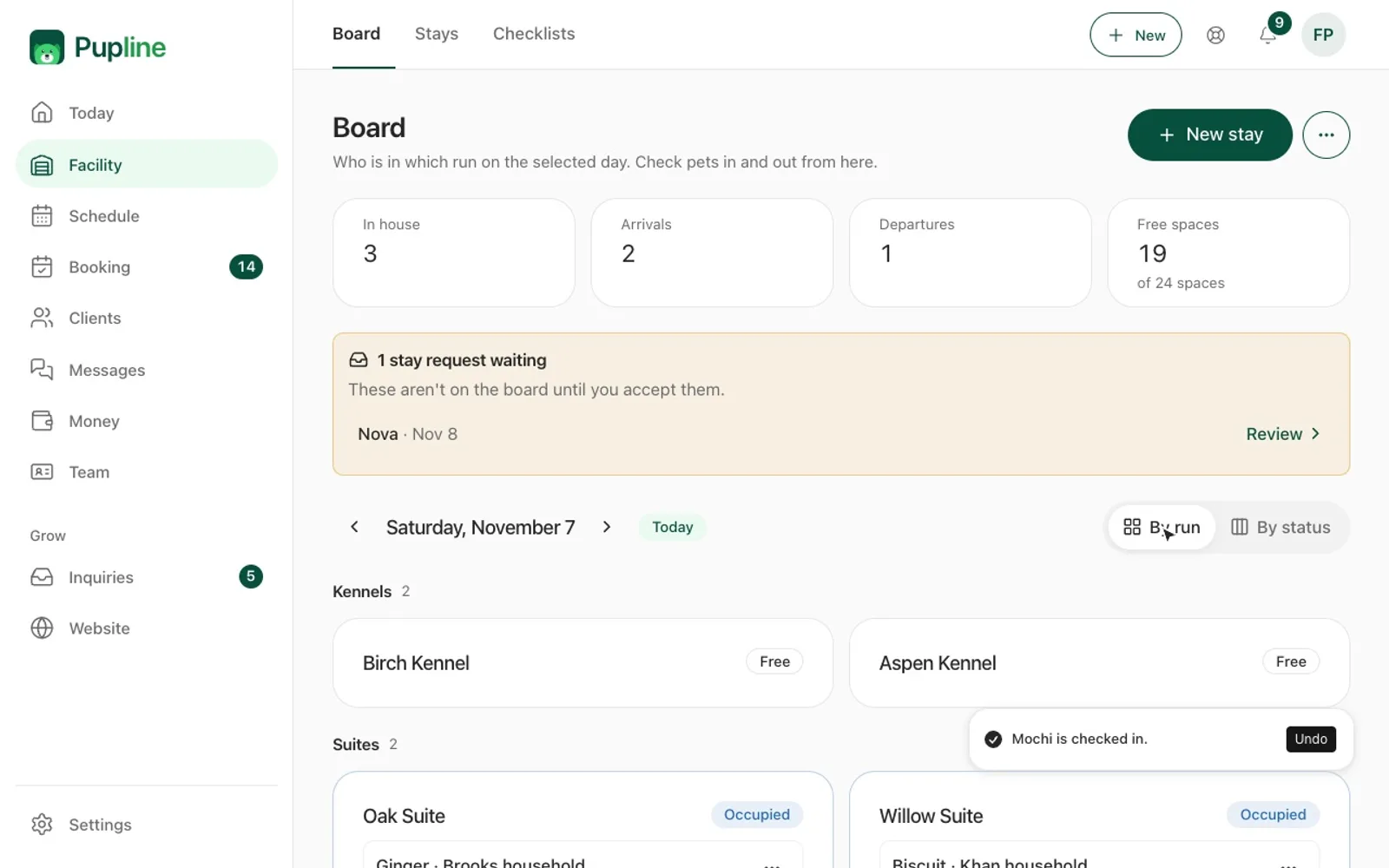
Pupline, for example, has an occupancy board showing who is in which named run, suite or room today, along with arrivals, departures and free spaces. Owners fill in a Care Card before each stay, and each pet record holds medications, allergies and the dogs they need to be kept apart from, with check-in and check-out timestamps for the stay history. Pupline runs in the browser and as an installable web app, so a tablet in the kennel block works without an app store download. Our ranking of the best kennel software compares occupancy boards and pet records across the main options, and the best dog boarding software page covers boarding-specific features.
If you are weighing up the cost of a system against staying on paper, our guide to dog boarding prices helps you work out what a single missed charge or a lost booking actually costs. When you do switch, the guide to switching pet care software covers moving your client and pet records across.
Frequently asked questions
What is a kennel card?
A kennel card is a printed card fixed to the front of a dog's kennel, run or suite during a stay. It shows the dog's name and photo, alerts such as allergies and behavior notes, feeding instructions, medication with times, routine and stay dates, so every staff member can care for the dog correctly without looking anything up.
What should be on a dog kennel card?
At minimum: the dog's name, photo, breed and run number, allergies and medical conditions, behavior alerts and dogs to keep apart, food type, amount and times, medication with doses and times, walk or play routine, and check-in and check-out dates. Keep owner contact details in your records, not on the front.
What is a run card?
A run card is another name for a kennel card, used mostly in boarding kennels where each dog has its own run. It carries the same information: who the dog is, how to feed and medicate them, alerts, and the dates of the stay. Some kennels also use the term for the daily log attached to the run.
Should kennel cards be color coded?
Color coding helps staff spot risks quickly, such as red for dogs that must not join group play, orange for medication and yellow for allergies. Choose a simple scheme, use it consistently on cards, collars and door clips, and post the key where every staff member will see it.
Can software replace kennel cards?
It can replace much of the work. An occupancy board shows which dog is in each run, and the pet record holds feeding, medication and alerts that are always current. Many kennels still print a card from the system at check-in so the essentials are visible on the run itself.
Sources
Keep reading
- GuidesDog Boarding Business Plan: A Full Outline With a Worked Example
- GuidesDog Boarding Contract Template and Dog Daycare Waiver
- GuidesDog Boarding Invoice Template: Free to Copy, With Tax Notes
- GuidesDog Boarding Licence UK: The Complete 2026 Guide
- GuidesDog Boarding Prices in 2026: What a Night Really Costs
- GuidesDog Daycare Intake Form: Free New Client Template